
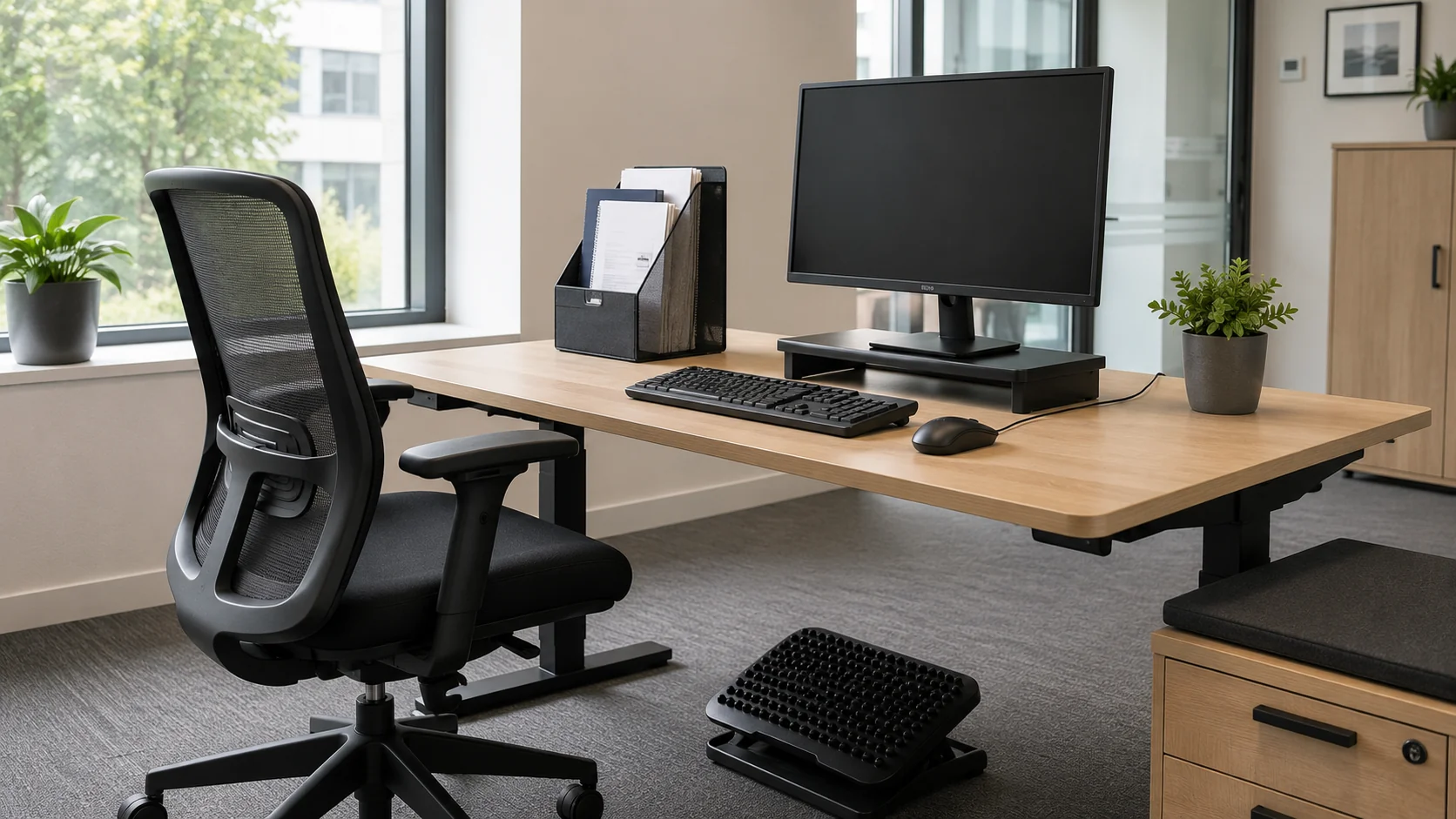
A DSE assessment examines the workstation, task and user to identify risks from display screen work and necessary controls. In Great Britain, the DSE Regulations cover employees who habitually use DSE as a significant part of normal work. HSE describes users as those using it daily for continuous periods of an hour or more, including at home.
The legal framework is the Health and Safety (Display Screen Equipment) Regulations 1992, as amended. Home working is covered; it is not a duty introduced by the pandemic or created specifically by the 2002 amendment. Northern Ireland has separate corresponding regulations.
This page covers what the regulations require, who counts as a "DSE user", how the assessment is carried out, and the specific position for home and hybrid workers.
Who counts as a DSE user
The regulations apply to workers who use display screen equipment "daily, as a significant part of their normal work" — defined in HSE guidance as roughly an hour or more of continuous or near-continuous use per day. The category covers anyone whose job centres around a screen: most office workers, software developers, customer service staff using a screen-based system, designers, journalists, finance professionals.
Home and hybrid employees are covered on the same basis. Agency work and use of another employer’s workstation require the organisations involved to coordinate their duties. The assessment should consider individual needs, including disability and pregnancy.
It doesn’t apply to occasional users — someone who logs into a terminal a few times a day for short periods, or who uses a screen only as an incidental part of a non-DSE job. The threshold is genuinely about regular, sustained use.
The workstation assessment in practice
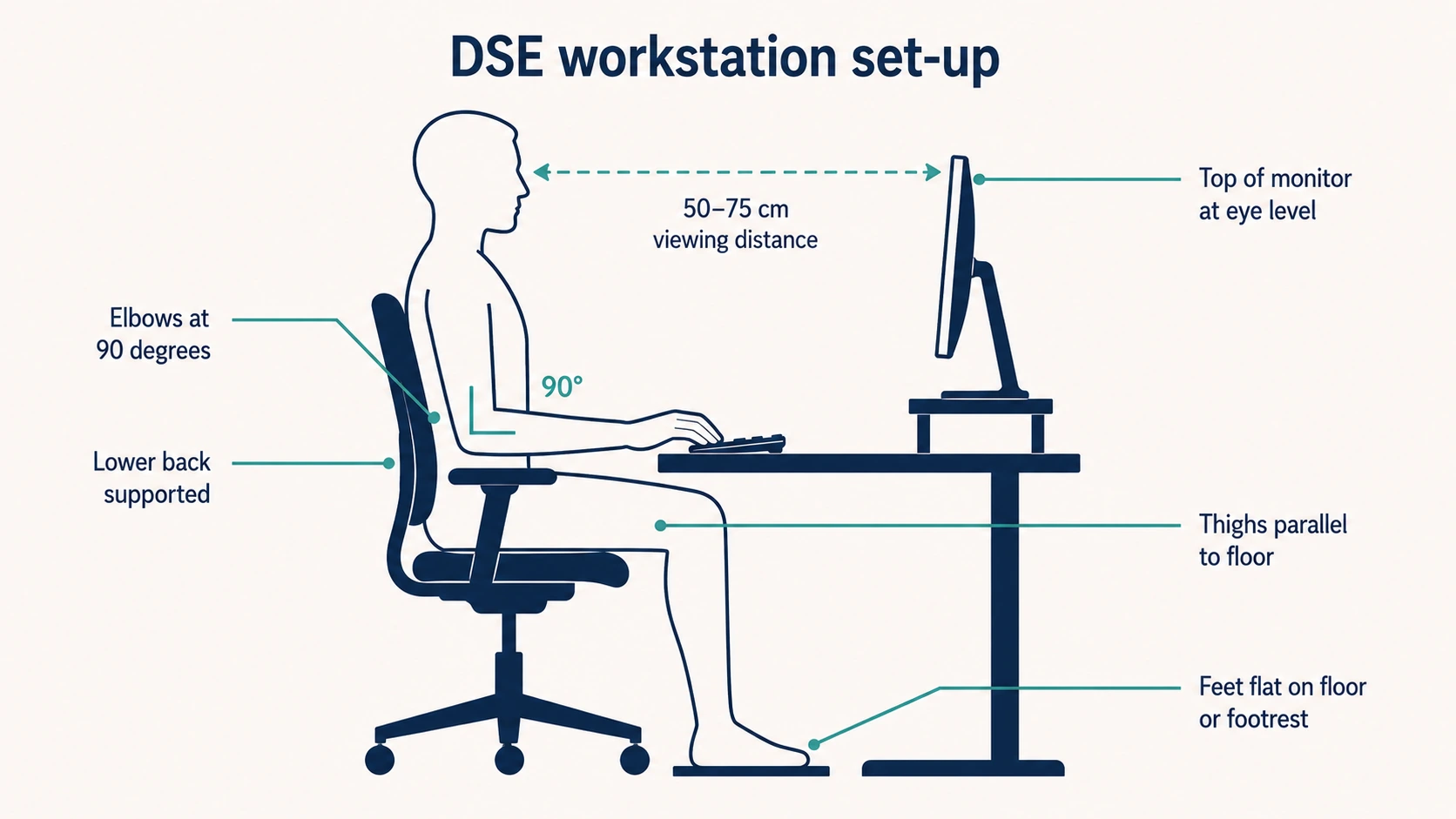
The assessment looks at the whole workstation, not just the screen. HSE’s L26 guidance breaks it into several elements.
The display screen
Size, resolution, refresh rate, glare, contrast and brightness control. The screen should be positioned to avoid glare from windows or overhead lighting, at a comfortable viewing distance (typically 50–75 cm), with the top of the screen at or just below eye level for most users.
The keyboard and mouse
Tiltable, separate from the screen, positioned so the user can adopt a comfortable posture without reaching. The mouse should be within easy reach without extending the arm.
The work surface and chair
The desk should be at the right height to allow the elbows to sit at roughly 90 degrees when using the keyboard. The chair should be adjustable in seat height, backrest position and ideally arm rest height. The user’s feet should rest flat on the floor (or on a footrest if the desk height can’t be adjusted enough).
The environment
Enough space for the user to move and change posture. Lighting that supports the work without glare. Acceptable noise levels. Temperature and humidity that don’t dry the eyes or cause discomfort. Power and data routing that doesn’t create trip hazards.
The software and the task
Software designed for the work, appropriate to the user’s skill level. Tasks structured to provide variety and natural breaks. Realistic targets that don’t drive sustained intensive use without rest.
A trained user can complete a workstation checklist, with the employer reviewing the findings and ensuring that problems are resolved. Remote assessment can be appropriate. The method must produce a suitable assessment of the actual workstation, task and user, rather than merely a completed generic form.
Eye and eyesight tests
Employers must arrange an appropriate eye and eyesight test for a DSE user who requests one. Repeat tests should follow the advice of the person carrying out the test, and be available where visual difficulties may reasonably relate to DSE work.
If the test shows that ordinary glasses cannot meet the DSE need and special corrective appliances are necessary, the employer must pay for basic suitable spectacles, including frames and lenses. The duty does not automatically cover a user’s ordinary prescription or optional upgrades.
Visual fatigue from sustained screen use is real but reversible. The legal duty isn’t to prevent eye damage from DSE — there’s no evidence that DSE use causes permanent eye damage — but to manage visual fatigue and to ensure users with vision problems can do their work without strain.
Breaks and task variation
Regulation 4 requires screen work to be interrupted by breaks or changes of activity that reduce the workload at the equipment. Plan these to reduce fatigue and discomfort, alongside suitable equipment and work organisation.
HSE advises that short, frequent breaks are better than longer, less frequent ones: for example, five to ten minutes each hour rather than twenty minutes every two hours. These are guidance examples, not fixed statutory break entitlements.
A change of activity can provide a break from DSE where it reduces the relevant workload. Allow movement and posture changes; switching to another screen-based task may not provide the same relief.
Home and hybrid working
Most online DSE guidance treats home working as a sidebar. It isn’t — for many office workers it’s the primary working pattern, and the regulations apply to the home workstation just as fully as they apply to one in the office.
The duty is the employer’s. The home worker can be asked to complete a self-assessment of their home workstation, but the responsibility to ensure the assessment is suitable and sufficient — and that any identified deficiencies are addressed — remains with the employer.
In practice, employers carrying out home worker assessments take one of three approaches. Some require a written self-assessment with photos, reviewed by a competent person and followed up where issues are identified. Some run virtual assessments by video call with a trained DSE assessor. Some provide an equipment baseline (chair, monitor, keyboard, footrest if needed) to standardise the home set-up.
For hybrid workers the assessment has to cover both workstations. A worker who spends two days a week at home and three days in the office has two workstations, both of which need to satisfy the duty. The office one is typically easier — it’s a controlled environment with standard equipment. The home one needs the same attention to chair, screen, keyboard, lighting and environment.
The assessment determines what equipment or adjustments are necessary. Where DSE equipment is needed to meet the employer’s health and safety duties, the worker cannot be charged for it. This does not automatically require funding every home-office expense.
This connects with working from home risk assessment, which covers the broader picture for home working beyond just the DSE workstation.
Special cases
Pregnancy
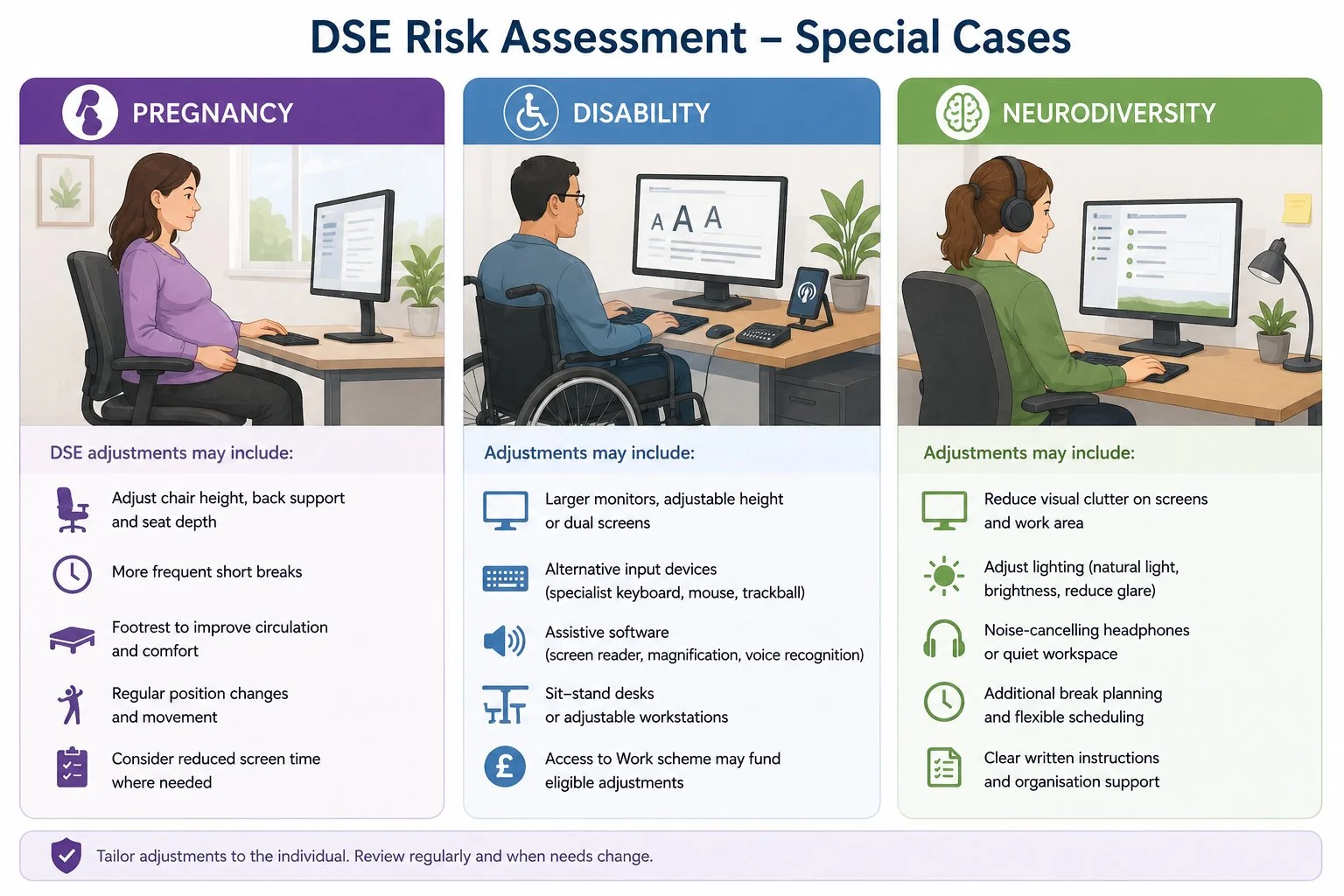
Pregnant DSE users often need adjustments — different chair settings, more frequent breaks, footrests for circulation — and the pregnancy risk assessment should account for any DSE-specific adjustments needed.
Disability
Where the worker has a disability, the Equality Act 2010 reasonable-adjustments duty engages alongside the DSE duty. Adjustments might include specific input devices, screen reader software, larger monitors, voice recognition, sit-stand desks, or modified working patterns. The Access to Work scheme is a useful funding route for some adjustments.
Neurodiversity
Specific adjustments — reduced visual clutter on screens, different lighting, additional break planning, noise-cancelling headphones — can make significant differences for autistic workers, workers with ADHD or dyslexic workers, and the assessment should consider whether these are needed.
The connection to MSDs
HSE estimated 511,000 workers with work-related musculoskeletal disorders and 7.1 million associated working days lost in Great Britain in 2024/25. These cover all types of work; they do not identify how many cases were caused by display screen use.
An assessment and evidence of action can help demonstrate how risks were managed, but a form alone does not establish compliance or determine a civil claim. Address the risks identified and review whether the controls are effective.
Records and review

The assessment record should cover the workstation, the user, the controls in place and any further action needed. Where adjustments have been made — equipment supplied, working pattern changed, training delivered — the record should reflect that.
Review when there is reason to doubt the assessment, a major change in equipment or work, a new user, or reported discomfort. Set any scheduled checks according to the circumstances; there is no universal two-year review interval.
Where this connects
DSE risk assessment overlaps with working from home risk assessment (which covers the broader home working duty beyond just the screen), stress risk assessment (because workstation problems and stress frequently co-occur in office workers), and pregnancy risk assessment (for DSE adjustments during pregnancy).
For organisations with significant DSE-using populations — most office-based employers, all hybrid workplaces — building competence in DSE assessment is worth the investment. Formal Risk Assessment Training covers the general method; DSE-specific training is then layered on for assessors who will support workstation reviews.
Frequently asked questions
Who counts as a DSE user under UK law?
An employee who habitually uses DSE as a significant part of normal work. HSE describes users as those using DSE daily for continuous periods of an hour or more. Assess the actual work pattern, including home and hybrid work, rather than relying only on a job title.
Do home workers need a DSE risk assessment?
Yes. The 1992 regulations, as amended in 2002, apply to home workstations as fully as they apply to office ones. The employer’s duty to assess and ensure a suitable workstation doesn’t transfer to the worker just because the workstation is in their home.
Does my employer have to pay for my glasses?
Where a DSE eye test identifies that the user needs corrective appliances specifically for DSE work — typically because their normal prescription doesn’t suit the screen viewing distance — the employer must pay for the basic provision of those appliances. The duty doesn’t cover the user’s normal prescription glasses if they would have needed those anyway.
How often should a DSE assessment be done?
Assess relevant workstations and users, then review when circumstances change or there is reason to suspect the assessment is no longer valid. New equipment, a new user or discomfort may trigger review. No fixed two-year interval applies.
Do hybrid workers need two assessments?
Both the home and workplace arrangements need to be covered. This does not prescribe two separate forms: the assessment must consider each workstation and any differing risks or controls.
Related guides
- How often should a risk assessment be reviewed?
- Who can carry out a risk assessment? The competence question explained
- Risk assessment examples: three worked examples for UK workplaces
Sources & references
- HSE — Working safely with display screen equipment
- HSE — DSE workstation assessments
- HSE — Eye tests for DSE users
- HSE — Breaks and changes of activity
- HSE — DSE at home
- HSE — Health and safety statistics, 2024/25
Make sure your managers and assessors are trained to carry out clear, defensible risk assessments.
Explore the Risk Assessment Training course →
Mark writes about workplace health & safety, risk assessment and accredited online training for Risk Assessment Training, part of Online CPD Academy.